2008年8月23日 星期六

VB 的Windows 應用程式程式架構

想要使用VB提供的應用程式架構, 但又想自己控制初始執行表單的順序...

這是上課時同學問的問題.

他的問題細節是這樣的, 要先有一個登入視窗, 通過登入流程之後, 顯示SplashScreen 之後才是MainForm.

過去我們會將這程序寫在Sub Main, 然後專案的"啟動表單"指定成為Sub Main.

但是在Visual Studio的Visual Basic專案, 若要指定Sub Main必須將"啟用應用程式架構"停用, 這代表無法享用Visual Baisc提供的應用程式架構, 這個同學的需求中又需要用到這個架構, 該如何解決這問題呢?

測試了一下, 我的解決方案如下:

Step1.使用 "檢視應用程式事件"
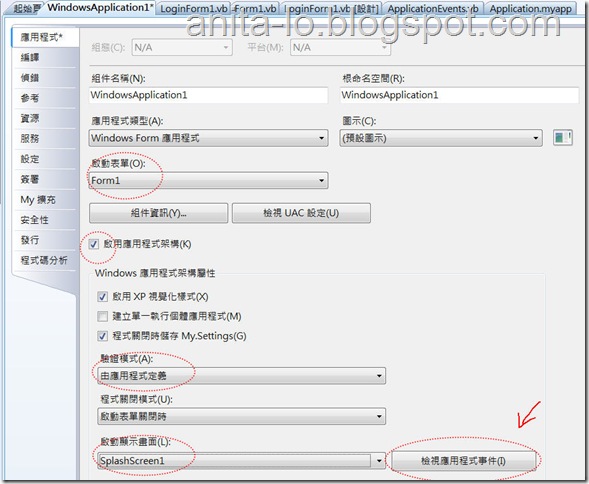
1

Step2.在ApplicationEvents.vb 覆寫 OnInitialize 方法

Protected Overrides Function OnInitialize(ByVal commandLineArgs As System.Collections.ObjectModel.ReadOnlyCollection(Of String)) As Boolean 

    LoginForm1.ShowDialog()

    If User.IsAuthenticated Then 
        Return MyBase.OnInitialize(commandLineArgs)

    End If

End Function


使用User.IsAuthenticated 檢查是否通過驗證, 如果通過驗證才繼續初始化(呼叫 MyBase.OnInitialize(commandLineArgs) ), 如果未呼叫MyBase.OnInitialize的話, Application不會繼續初始化, 應用程式就會自動結束.


完成!!


A1: 為什麼要覆寫OnInitialize 而不寫在Statup 事件?

Q1: 因為Statup事件已經啟動SplashScreen, 不符合要先Login 再進SplshScreen 的需求. 而且無法控制登入失敗要終止程式(無法呼叫Application.Exit方法)


A2: 怎麼寫LoginForm1的程式?

Q2: 以下步驟解說:


     step1: 加入新項目, 選取"登入表單"

     step2: 允許兩次登入失敗, 宣告變數記錄


Dim errorTry As Short = 0


    step3: 修改OK 按鈕的Click事件如下: (要Imports System.Security.Principal)


Private Sub OK_Click(ByVal sender As System.Object, ByVal e As System.EventArgs) Handles OK.Click  
    Dim roles() As String
    If Not CheckUser(UsernameTextBox.Text, PasswordTextBox.Text, roles) Then
        errorTry += 1
        If errorTry >= 3 Then
            Me.Close()
        End If
        Return
    End If
    Dim iden As New GenericIdentity(UsernameTextBox.Text)
    My.User.CurrentPrincipal = New GenericPrincipal(iden, roles)
    Me.Close()
End Sub

  在登入成功之後, 設定My.User.CurrentPrincipal, 就可以讓User.IsAuthenticated 回傳True.   


    step4: CheckUser 方法是寫檢查帳號密碼的程式, 請自行設計, 下列程式僅供參考.


Private Function CheckUser(ByVal Username As String, ByVal Password As String, ByRef Roles() As String) As Boolean  
    If String.IsNullOrEmpty(Username) Then
        Return False
    End If
    Roles = New String() {"Users"}
    Return True
End Function

2008年8月15日 星期五

ASP.NET 3.5 sp1 新增的 Dynamic Data網站

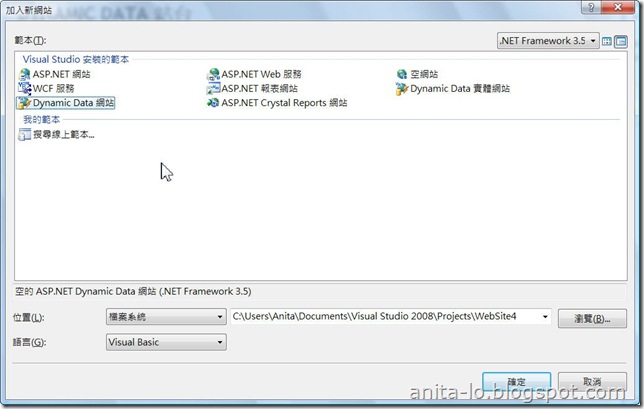
Visual Studio 2008 sp1 在建立ASP.NET 網站的範本中多了"Dynamic Data網站"Dynamic Data 網站範本

又是一個令人 "哇!" 的功能, 簡單來說, 建立網站之後, 他只需要做三個步驟就可以完成網頁資料表的"新刪修"功能.

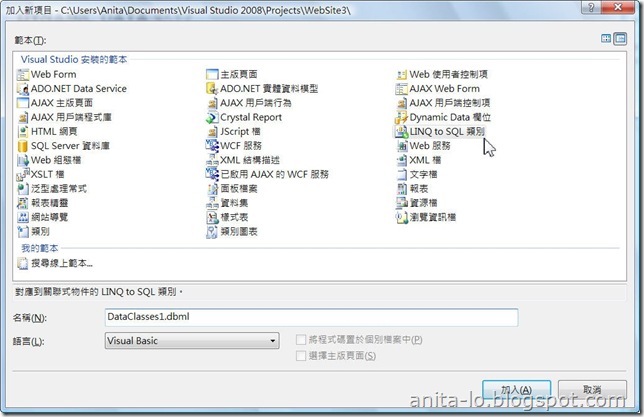
1. 加入新項目 "Link to SQL 類別"

選擇Link to SQL

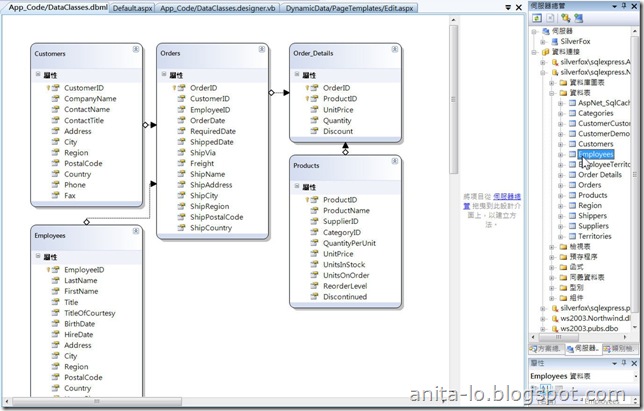
2.伺服器總管連到Northwind資料庫, 並將必要的資料表拖拉到Link to SQL 類別的設計視窗.

設計Link to SQL

3.接著修改Global.asax的程式碼, 移去下面這行程式的註解, 並修改"YourDataContextType"為第一步驟加入的Link to SQL的類別名稱, 以及設定ScaffoldAllTables 屬性為True即可.

model.RegisterContext(GetType(DataClassesDataContext), _
                      New ContextConfiguration() With {.ScaffoldAllTables = True})

執行結果:

執行結果1 - 資料表名稱

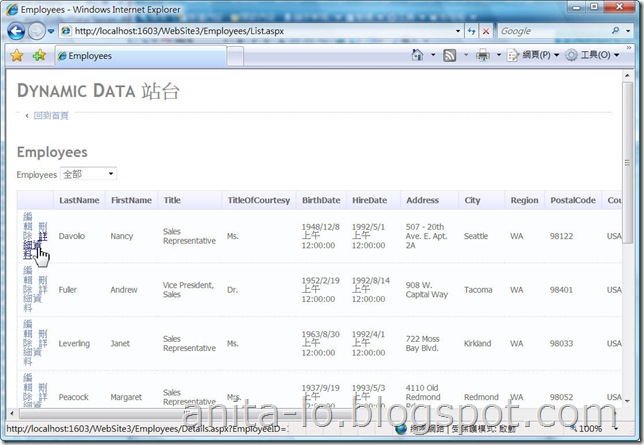
點選"Employees"之後

執行結果2 - Employees List

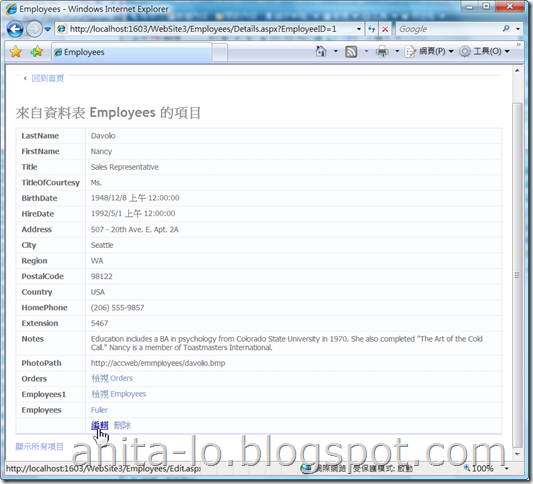
點"詳細資料"

執行結果3 - Employees Detail


相關參考: Your First Scaffold, and What Is Dynamic Data-

2008年8月12日 星期二

Visual Studio 2008 SP1 開放下載了

Visual Studio 2008 SP1 已經於8/11開放下載了.

http://www.microsoft.com/downloads/details.aspx?displaylang=zh-tw&FamilyID=fbee1648-7106-44a7-9649-6d9f6d58056e

注意事項:

  1. 最好先完成作業系統的Windows Update再安裝VS2008 SP1.
  2. 如果是Vista 請先關閉"Windows 資訊看板"
  3. 若之前曾安裝一些Beta 版的相關軟體, 請先移除.
  4. 如果還是裝不起來, 請先閱讀上面Link頁中的ReadMe

2008年5月31日 星期六

DataGridView - 加入ComboBox 欄位

DataGridView 支援多種欄位控制項, 包含CheckedBox, ComboBox, Image ... 等. 可以被加入DataGridView的欄位物件必須是DataGridViewColumn 類別的延伸類別, .NET 內建DataGridViewComboBoxColumn, 即可呈現ComboBox 的效果. 屬性列表:

  • DataPropertyName: 繫結到DataGridView 的欄位
  • DataSource: 下拉內容的資料來源
  • DisplayMember: 顯示的欄位
  • ValueMember: 不會顯示的欄位
下面這段範例是說明如何在產品資料表中包含一個分類的下拉選項, DataGridViewComboBoxColumn 必須與Categories 進行資料繫結.
        Dim combo As New DataGridViewComboBoxColumn
combo.DataSource = CategoriesBindingSource
combo.DataPropertyName = "CategoryID"
combo.DisplayMember = "CategoryName"
combo.ValueMember = "CategoryID"

ProductsDataGridView.Columns.Insert(0, combo)


執行結果如下:


ComboBox

2008年5月23日 星期五

DataGridView - Row的條件格式化

上一篇是針對儲存格的條件格式化, 這一篇是針對資料記錄, 例如, 檢查庫存量小於10時, 將整筆記錄以紅色顯示.
DataGridView在進行Row的繪制流程時會觸發兩個事件, 分別是RowPrePaint及RowPostPaint, 這裡是要在處理完Row的繪製動作之後, 再將每個儲存格背景色改為紅色, 所以是在RowPostPaint事件處理.

使用e.RowIndex取得DataGridViewRow物件,取出DataGridViewRow物件後, 經由DataBoundItem屬性取得該筆記錄,
然後判斷記錄欄位是否符合條件, 若符合條件, 修改該記錄的每個儲存格Style.BackColor屬性.

    Private Sub ProductsDataGridView_RowPostPaint(ByVal sender As Object, ByVal e As System.Windows.Forms.DataGridViewRowPostPaintEventArgs) Handles ProductsDataGridView.RowPostPaint
If e.RowIndex <= 0 Then
Return
End If
Dim row As DataRowView
row = CType(ProductsDataGridView.Rows(e.RowIndex).DataBoundItem, DataRowView)
If row("UnitsInStock") < 10 Then
For Each cell As DataGridViewCell In ProductsDataGridView.Rows(e.RowIndex).Cells
cell.Style.BackColor = Color.Red
Next
End If
End Sub


圖: 庫存量小於10, 整筆以紅色顯示.
01

DataGridView - 儲存格條件格式化

若要在DataGridView中提供儲存格的條件格式化, 例如, 檢查庫存量為零時, 儲存格背景色顯示為紅色.
這代表要對儲存格進行繪製作業, 可以在CellPainting 事件處理.

DataGridViewCellPaintingEventArgs 事件參數,提供ColumnIndex, RowIndex, Value, CellStyle, PaintBackground 等屬性, 可以利用這些屬性是處理引發事件的儲存格.

範例中我使用e.ColumnIndex 找到控制項對應的欄位名稱, 並確定是在進行記錄而不是標題處理(e.RowIndex >0), 才檢查儲存格是否為0. 透過CellStyle的BackColor 改變目前儲存格的背景色.

   Private Sub ProductsDataGridView_CellPainting(ByVal sender As System.Object, ByVal e As System.Windows.Forms.DataGridViewCellPaintingEventArgs) Handles ProductsDataGridView.CellPainting
If e.ColumnIndex <= 0 Then
Return
End If
Dim column As DataGridViewColumn
column = ProductsDataGridView.Columns(e.ColumnIndex)

If column.DataPropertyName = "UnitsInStock" AndAlso e.RowIndex > 0 _
AndAlso e.Value = 0 Then
e.CellStyle.BackColor = Color.Red
End If

End Sub


圖1: 庫存量為零的儲存格, 背景色為紅色.

01

2008年5月22日 星期四

DataGridView - 執行階段調整欄位順序

若要讓DataGridView 可以在執行階段調整欄位順序倒不是一件難事, 只要設定控制項的AllowUserToOrderColumns 屬性為True即可達到效果. 此屬性預設是False.

圖1: 拖拉QuantityPerUnit欄位
01

圖2:欄位調整後
02